
Check out the NEW Stockists page!
Stockists have been moved to Airtables (the same platform used for the Size Inclusive Collective Repository) for easier viewing and includes the ability to filter the results by a number criteria. The most used will be region.
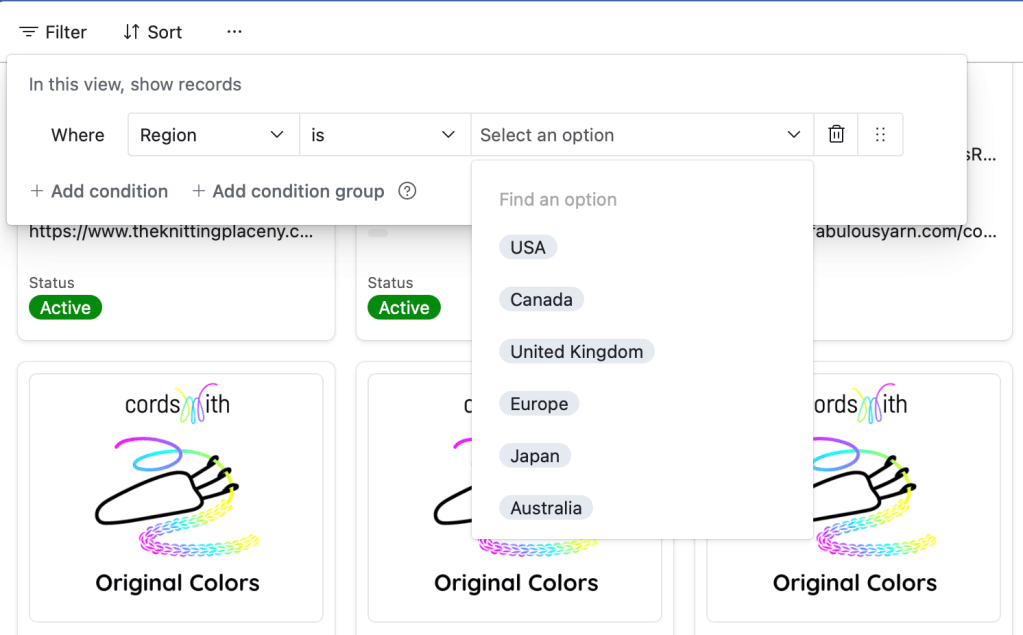
To filter by region:
Click ‘Filter’ on the top left of the screen.
Click ‘+ Add condition’
Set ‘Where’ to ‘Region’ from the drop down list of options.
Leave ‘Is’ set to ‘Is’.
In ‘Select an option’ you’ll be able to select your region from options including USA, Canada, United Kingdom, Europe, Japan, Australia, and New Zealand. As more stores join from more regions, the list will grow! Want to change your filter criteria? Click the little trash can to the right and then click ‘Add condition’ again to start over.
Additionally, there is a search field on the top right of the screen that looks like a magnifying glass. You can use this to type in a store name, state, etc. to help narrow down your search and then use the little arrows next to the number of results to quickly browse up and down through the options as shown here:


 ByAutumn